

To present an industrial product, a 3D animation video is the right choice when you need to be seen widely, and an interactive 3D demonstrator is the right choice when each person asks their own question and the asset has to serve for several years. A video shows everyone the same sequence and plays anywhere, but every change requires a new render. A demonstrator is handled in real time and can be updated. And “one or the other” is often the wrong question, because a single 3D model can produce both.
You may already have “a 3D video of the product” in mind for the next trade show, perhaps even a quote on your desk. Before you sign, check that the format fits the use: on the stand, in sales meetings, on your website, and in three years' time, once the product has evolved. METASENSE, a Creative Tech agency based in Vélizy-Villacoublay, designs and produces both formats. It therefore has no format to defend, and will tell you when a video is enough. Its offer is set out on the interactive 3D demonstrator page.
In short
- A video shows everyone the same sequence, rendered in advance. It plays anywhere, from social media feeds to a stand screen.
- A demonstrator answers the question of whoever is handling it: transparency, exploded view, animated movements, information cards.
- Video wins when the product can be understood in a minute, when you need to reach people who will never have it in their hands, and when nobody will touch the screen.
- The demonstrator wins when each person asks a different question, when the inside matters, and when the asset has to serve for several years.
- The cost does not show on the first quote: a video is paid for by the minute, and every change is paid for again. The cost of an interactive 3D demonstrator is concentrated in its creation, then spread across the trade show, the sales meeting, the website and training.
What distinguishes an industrial 3D animation from an interactive 3D demonstrator?
An industrial 3D animation and an interactive 3D demonstrator often start from the same CAD files, but in the video, the editor decides what you look at, and in the demonstrator, the person handling it does: buyer, engineer or technician.
- An industrial 3D animation is a computer-generated film that shows a product, a machine or a process, built from its CAD files or from a 3D model. Every frame is rendered in advance, then edited. Every viewer sees the same sequence, in the same order.
- An interactive 3D demonstrator is a 3D representation of the same product, displayed in real time, that you handle yourself. You rotate it, make its casing transparent, separate its sub-assemblies in an exploded view, watch its mechanisms at work and open an information card on each key point. It is also called an interactive 3D product presentation.
The difference plays out in front of the screen. A video viewer gets answers to the questions the editor anticipated. Someone holding a demonstrator asks their own. A buyer wants to judge the footprint, an application engineer the connection between two sub-assemblies, a technician the access to a wear part. A single film cannot follow all three.
Real-time or pre-rendered 3D: what changes?
In pre-rendered 3D, each frame is computed in advance with no time limit, which gives maximum realism but a fixed image. In real-time 3D, the image is recomputed 30 to 60 times per second as you interact, according to the glossary of engine publisher Unity, and realism then depends on the hardware computing it. That glossary, consulted on 13 October 2026, puts it this way: real-time 3D technology “renders complex three-dimensional environments instantly as changes occur”, at “interactive framerates (typically 30-60+ frames per second)”, “unlike pre-rendered 3D that requires lengthy processing to produce final images”.
An animation can therefore reach a level of photorealism that a stand screen cannot achieve live: reflections, materials, smoke, the lighting of a complete environment. A demonstrator, on the other hand, responds to a gesture, which no video does. Its realism depends on the machine computing it: in a browser, it stops at what a page can load quickly. On a dedicated workstation, with Unity or Unreal Engine, it goes much further.
For technical readers, the choice of web tools is covered in our article Three.js, React Three Fiber or Spline.
3D video or interactive demonstrator: how do they compare, criterion by criterion?
Between a 3D animation video and an interactive 3D demonstrator, neither format wins on every criterion: video comes out ahead for wide distribution, hardware and screens nobody touches, the demonstrator for sales meetings, self-service exploration, updates and usage measurement. Lifespan depends mainly on the 3D model, and cost is compared over the period of use.
| Criterion | 3D animation (pre-rendered video) | Interactive 3D demonstrator |
|---|---|---|
| Cost | Paid for by the minute of film. Every change, version or added language requires a new render and a new edit. | Concentrated in the creation, then spread across the trade show, the sales meeting, the website and training. Updated in small increments. |
| Lead time | Depends on the length of the film, the number of scenes, the frame rendering time and the rounds of approval on the edit. | Depends on the product and the files available, the number of points of interest and animated movements, the level of realism and the target media. Planned backwards from the trade show date. |
| Lifespan | That of the product version filmed. Can be re-rendered if the 3D model has been kept. | Evolves with the product: versions, options and languages are added. |
| Updates | New render, new edit. | Change to the model or the cards, one source for every medium. |
| Stand | Readable from the aisle, no intervention needed, works on any screen. | Stops the visitor who touches the screen and gives the salesperson a starting point. Must run on its own when nobody is touching it. |
| Sales meeting | Can be shown, but cannot answer the unexpected question. | The salesperson opens the part being discussed. |
| Website | Wide distribution: product page, video platforms, social media, email. | Self-service exploration on the product page. A demo request can arrive with what the visitor looked at, with their consent. |
| Usage measurement | Views and share of videos watched to the end, online. Nothing on a stand screen. | Sessions started, exploration time, most-viewed points, anonymous at a trade show. |
| Hardware | Any screen or player. | A browser on a touchscreen, tablet or computer. A dedicated workstation for high fidelity. |
On the product page, the same trade-off exists between photos and 3D: we cover it in 3D or photo for product pages.
What drives the cost of a 3D animation, and of an interactive 3D demonstrator?
A 3D animation is paid for by the minute of film, and every change, version or added language is paid for again with a new render. The cost of an interactive 3D demonstrator is concentrated in its creation, then spread across the trade show, the sales meeting, the website and training, and it is updated in small increments. The two quotes should therefore be compared over the period of use, not on the day you sign.
- What weighs on both: modelling (usable CAD files or a product to model), the complexity of the product, the level of realism.
- What weighs on the video: length, number of scenes, sound and voice-over, format and language versions.
- What weighs on the demonstrator: the number of points of interest and animated movements, the target media (stand, tablet, website), the languages.
METASENSE does not publish a price list: we price each project individually, after an initial conversation, once the product, the files and the deadline are known.
When is 3D video the best choice?
3D video is the best choice for presenting an industrial product when the product can be understood in a minute, when you need to show it to people who will never have it in their hands, when you are telling a story or showing a process, when you are aiming for photorealism, and when nobody will touch the screen. In detail:
- Distribute beyond the stand. A demonstrator cannot be posted in a LinkedIn feed or run as an ad. A video can.
- Tell a story. Rhythm, music, a voice-over, building tension: the order imposed by the edit is a strength when you want people to feel something rather than have it explained.
- Show what cannot be handled. A flow, a production line, a process that lasts hours and can be told in a few seconds.
- Aim for maximum photorealism. Pre-rendering has no time limit per frame: for a launch image or a brand film, it stays ahead.
- Equip a screen nobody will touch. A plenary session, a raised video wall, a screen behind a counter.
If your product can be understood in a minute and your main goal is to be seen, order the video.
When does the interactive 3D demonstrator win?
The interactive 3D demonstrator beats video when the product raises different questions depending on who is looking, when its inside matters, when a salesperson has to answer by showing the part in question, and when the same asset has to be reused for years, from the stand to the product page.
The sales meeting is the clearest case. A Gartner survey of 632 B2B buyers (August-September 2024) found that 61% of them “prefer an overall rep-free buying experience”. The detail matters more than the figure: buyers favour online self-service tools for general information, but want a seller's input to judge whether the product fits their situation. The demonstrator serves both moments: self-service on the product page, then on the salesperson's tablet when the specific question comes up.
A US survey by Freeman, a company that itself sells trade show services, adds a nuance: for 74% of attendees who had hands-on exposure at their most important business event, the most important of these experiences involved a physical product, against 26% for a digital tool (Commercial Trends Report 2025, p. 22). When the product cannot come to the stand, handling it on screen is the closest thing.
And nobody can promise you a conversion rate. The conversion figures in circulation do not publish their methodology, and a 2024 study in Industrial Marketing Management describes the use of augmented and virtual reality in B2B customer experience as an area that is “largely unexplored academically”. A demonstrator is justified by what it lets you show, not by a percentage.
What does an interactive 3D exploded view add compared with a filmed one?
Filmed, an exploded view plays once, at the speed and from the angle chosen in the edit. Interactive, it lets the visitor control how far the parts spread, isolate a sub-assembly, go back and open the card for the part they care about. One rule applies to both formats: a credible exploded view follows the real disassembly order. If it separates the parts in an impossible order, it loses the engineer within seconds.
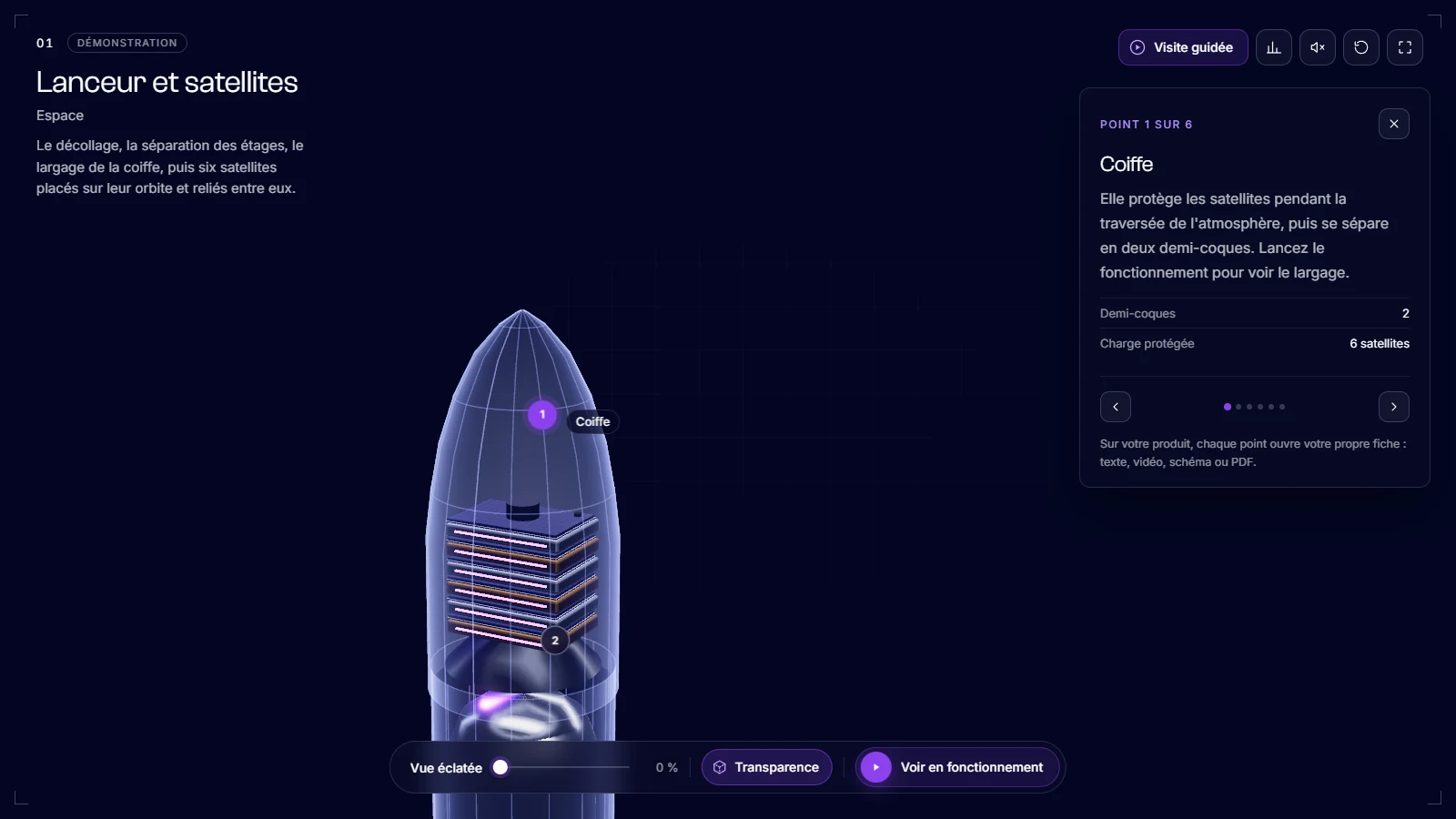
The launcher below is a demonstration modelled by our teams and branded METASENSE. Tap or click it to start it, then try it yourself.
What you can do with it:
- Transparency: the casing fades away to reveal the tanks and the satellites under the fairing.
- Exploded view: the fairing opens, the satellites spread out, the stages separate to reveal the second-stage engine, then everything reassembles.
- Animated movements: lift-off, stage separation, grid fins deploying, and the satellites being released and lining up in their orbit. The sequence is condensed.
- Six points of interest: the fairing, the satellites, the tanks, the second-stage engine, the grid fins and the engines, each with its own card.
Do you really have to choose between video and demonstrator?
You do not have to choose between a 3D video and an interactive 3D demonstrator: a well-built 3D model produces both, and the real decision is about the order of investment, not the format. The film below comes from the same model as the demonstration in the previous section: same launcher, same sequences, this time in a social media format.
The principle goes beyond our own demonstrations. For dealer group Edenauto, at the launch of the Kia Picanto, METASENSE built a WebGL 3D configurator, augmented reality that places the vehicle at full size with no app, and a FOOH campaign (“fake out of home”: a computer-generated street scene made to look real, shared on social media), whose visual was taken from the same 3D model as the configurator. Details are on the Kia × Edenauto project page, and the configurator is live.
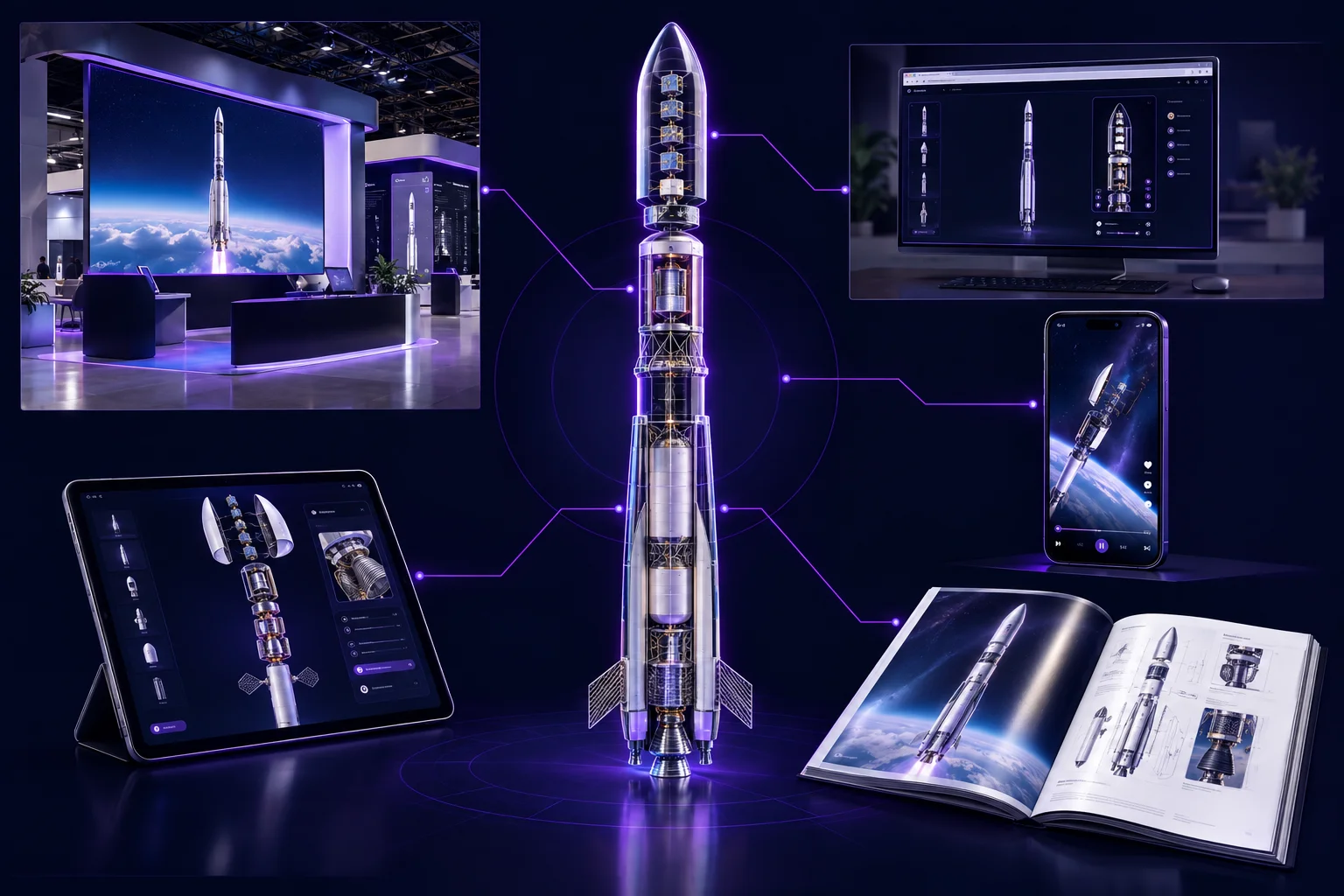
One model thus feeds the stand screen, the salesperson's tablet, the product page, the films for social media and the catalogue visuals. Anyone who orders a film first without keeping the model will pay for the modelling twice on the day they want a demonstrator.
What should you require from a studio to keep the 3D model of a video?
To be able to derive a demonstrator later from a 3D video ordered today, the studio's quote must include three things: delivery of the source files of the 3D scene, an export in a common exchange format, and the assignment of reuse rights on other media.
- The scene source files: the working file from the 3D software the studio uses, with the models, their materials and their animations, in addition to the final film. Without them, the modelling has to be redone, or rebuilt from the CAD files when they exist.
- An exchange format: in addition to the native file, an export readable by other software, for example FBX or glTF. A model prepared for a film usually needs to be lightened for real time, but you start from its geometry instead of remodelling it.
- The rights: an assignment that explicitly covers reuse of the model and the images on media other than the film, not just its distribution. Elements the studio itself licensed (textures, music, library models) cannot always be assigned: the quote must say so.
On the stand: a loop to attract, then control to the visitor
On a stand screen, the best solution combines both: a presentation that runs on its own, readable from the aisle, and hands over control as soon as a visitor touches the screen. A video loop can play this attract role. A demonstrator's kiosk mode does it without a separate file: with no visitor, a guided tour plays by itself, and it stops at the first touch. To design the stand around the installation, see our article on the immersive trade show stand.
How do you decide, in three questions?
To decide between a 3D video and an interactive 3D demonstrator, three questions are enough: who is watching, where, and for how long the asset has to serve.
- Who is watching? A passer-by who will not stop calls for a video. Someone who asks their own questions (buyer, engineer, distributor) calls for a demonstrator.
- Where? A news feed, an ad, a screen nobody touches: video. A hand, a tablet, a product page, a meeting table: demonstrator.
- For how long? A launch campaign: video is often enough. Several years of trade shows, several languages, a product that evolves: the demonstrator pays back better.
When the answers point both ways, the order that avoids paying for the modelling twice is the 3D model first, then the demonstrator, then films taken from the same model. If your main need is to let people choose options (colours, versions, equipment), that is a different tool: the 3D product configurator. It helps people choose options, not understand how the product works, and it can be combined with a demonstrator.
Let's talk about your product
Tell us what you want to show, and where: we will look with you at whether a video is enough, or what a demonstrator would change on your stand, in sales meetings and on your website. At METASENSE, consulting and production, from modelling to development, stay within the same team.
Frequently asked questions
To present an industrial product, do you need a 3D animation video or an interactive 3D demonstrator?
To present an industrial product, a 3D animation video works when the product can be understood in a minute and needs to be seen widely: social media, advertising, a screen nobody touches. An interactive 3D demonstrator works when buyers, engineers and technicians each ask their own question, in sales meetings as well as on the website. A single 3D model can produce both.
How much does a 3D animation cost, and an interactive 3D demonstrator?
The price of a 3D animation depends on its length, the modelling, the level of realism, the sound and the languages, and every change is paid for again with a new render. The cost of an interactive 3D demonstrator depends on the product, the points of interest, the animated movements, the level of realism and the target media. METASENSE prices it individually, after an initial conversation.
Real-time or pre-rendered 3D: which should you choose?
Pre-rendered 3D computes each frame in advance, with no time limit: it offers maximum realism, but the image is fixed. Real-time 3D recomputes the image 30 to 60 times per second as you interact, according to the glossary of engine publisher Unity (consulted on 13 October 2026): it allows interaction, with realism that depends on the hardware. Pre-rendering suits film, real time suits the demonstrator.
Can you derive a video from a 3D demonstrator, or the other way round?
Yes, provided you start from a 3D model built to last. The same model feeds the interactive demonstrator, the films for social media and the catalogue visuals. For dealer group Edenauto, at the launch of the Kia Picanto, the visual for the FOOH campaign, a computer-generated street scene made to look real, was taken from the same 3D model as the configurator built by METASENSE.
Is a 3D animation enough for a trade show?
A 3D animation is enough if the stand screen is mainly there to catch the eye from the aisle and the product can be understood in a minute. It does not answer the visitor who stops and asks a specific question. The most complete solution runs on its own while nobody touches the screen, then hands control to the visitor.
What is an interactive 3D exploded view?
An interactive 3D exploded view separates a product's sub-assemblies on screen, in disassembly order, and lets the visitor control how far they spread: they isolate a part, go back, open the card for the part they care about, then reassemble the whole. A filmed exploded view, by contrast, plays only once, from the angle chosen in the edit.
What affects the lead time of a 3D animation or a demonstrator?
For a 3D animation: the length of the film, the number of scenes, the frame rendering time and the rounds of approval on the edit. For a demonstrator: the product and its files, the number of points of interest and animated movements, the level of realism and the target media. When there is a deadline, a trade show for example, the schedule is planned backwards from that date.
Can a 3D animation be updated when the product evolves?
Yes, but each update requires a new render and often a new edit. If the 3D model has been kept, the video can be re-rendered without starting over. A demonstrator is updated in its model or its cards, and the change applies to the stand, the sales meeting and the website.
Do you need CAD files to create a 3D animation or demonstrator?
No, but they help. CAD files, in native or exchange formats such as STEP, give the exact geometry and avoid remodelling the product. Without CAD files that can be shared, the product is modelled from drawings, photos or references, then your engineers validate its accuracy. The original files must never be published.
Sources
- Unity, glossary, “Real-time 3D” (definition of real-time 3D and frame rate of 30 to 60 frames per second), consulted on 13 October 2026.
- Gartner, press release of 25 June 2025, “Gartner Sales Survey Finds 61% of B2B Buyers Prefer a Rep-Free Buying Experience” (632 B2B buyers, August-September 2024).
- Freeman, Commercial Trends Report 2025, p. 22 (survey of 1,022 attendees and 969 exhibitors, mostly in the United States).
- Wieland, Ivens, Kutschma and Rauschnabel, “Augmented and virtual reality in managing B2B customer experiences”, Industrial Marketing Management, vol. 119, 2024, pp. 193-205.