

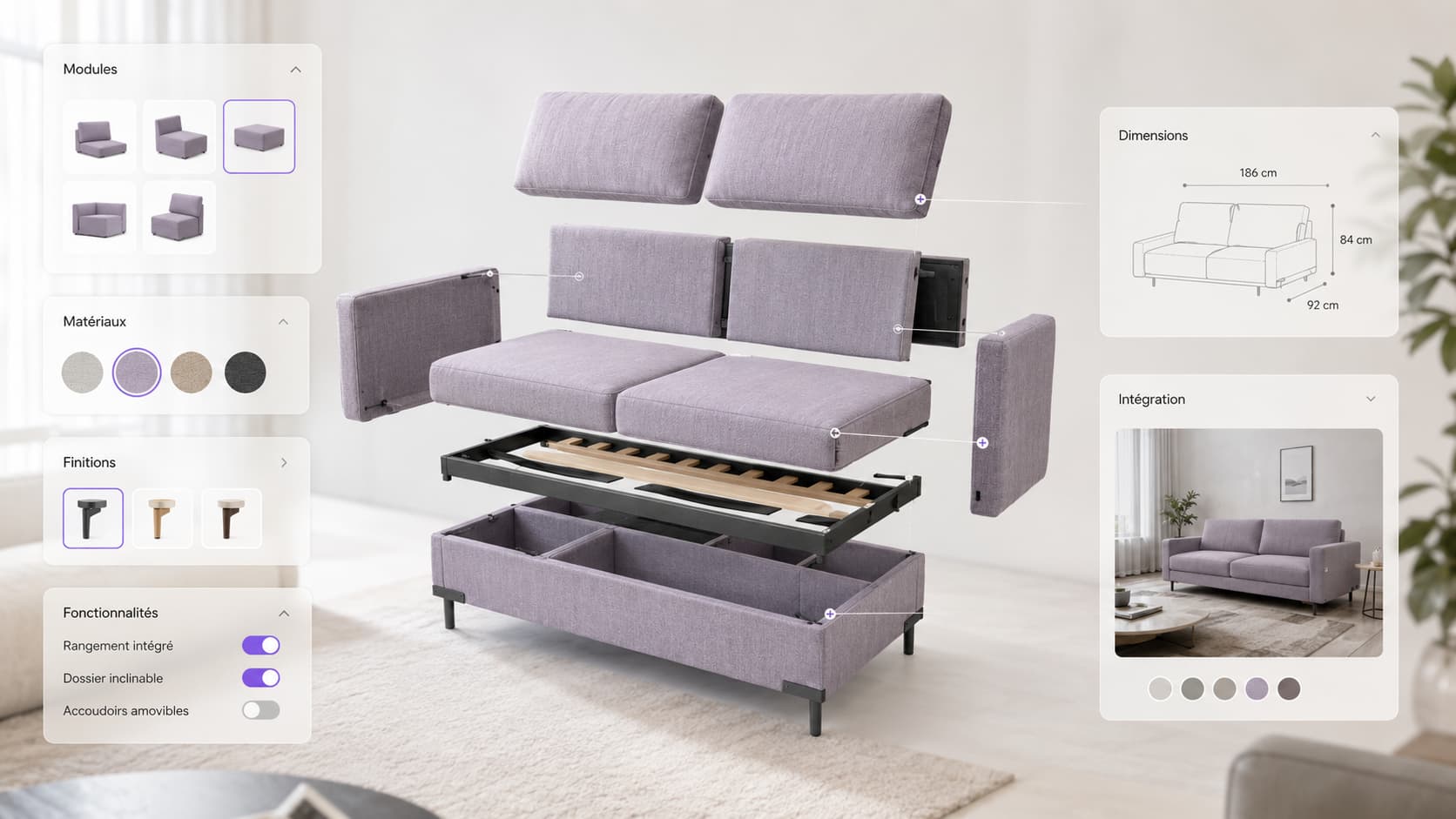
A 3D product configurator is an interactive module that displays a product in real-time 3D on an e-commerce product page and lets the visitor personalise it — colour, material, dimensions, options — and see the result instantly, from every angle. Its value is not aesthetic, it is commercial. By removing the doubt about "what will this actually look like", it raises conversion and reduces returns. Shopify has reported a conversion rate up to 94% higher on product pages carrying 3D/AR content than on those without — a self-reported average, to be read as an order of magnitude, not a guarantee.
But a 3D configurator only makes sense for certain products, and it is worth nothing if it takes your page from 2 to 8 seconds of load time. This article settles the real question: when a 3D configurator makes money, and how to integrate it cleanly on Shopify, WooCommerce or Webflow without sacrificing performance or search rankings.
In short
- A 3D configurator converts best on customisable, high-variant, high-value products (furniture, automotive, equipment, packaging, jewellery).
- Documented benefits: conversion up, returns down (Shopify: conversion rate up to 94% higher; -40% returns according to vendors — reported averages, not guarantees).
- The trap is performance: integrated badly, 3D degrades Core Web Vitals and SEO. Integrated properly (HTML-first, 3D deferred), it costs nothing in perceived load time.
- Off-the-shelf SaaS vs custom-built: SaaS is fast to launch; custom aligns performance, brand and integration with your stack.
What exactly is a 3D product configurator?
A 3D product configurator is a web interface that combines a real-time 3D model with an options panel, so the buyer can compose a product and see it immediately before purchase. Technically it runs on WebGL — the technology that lets a browser display GPU-accelerated 3D with no plugin and no app to install.
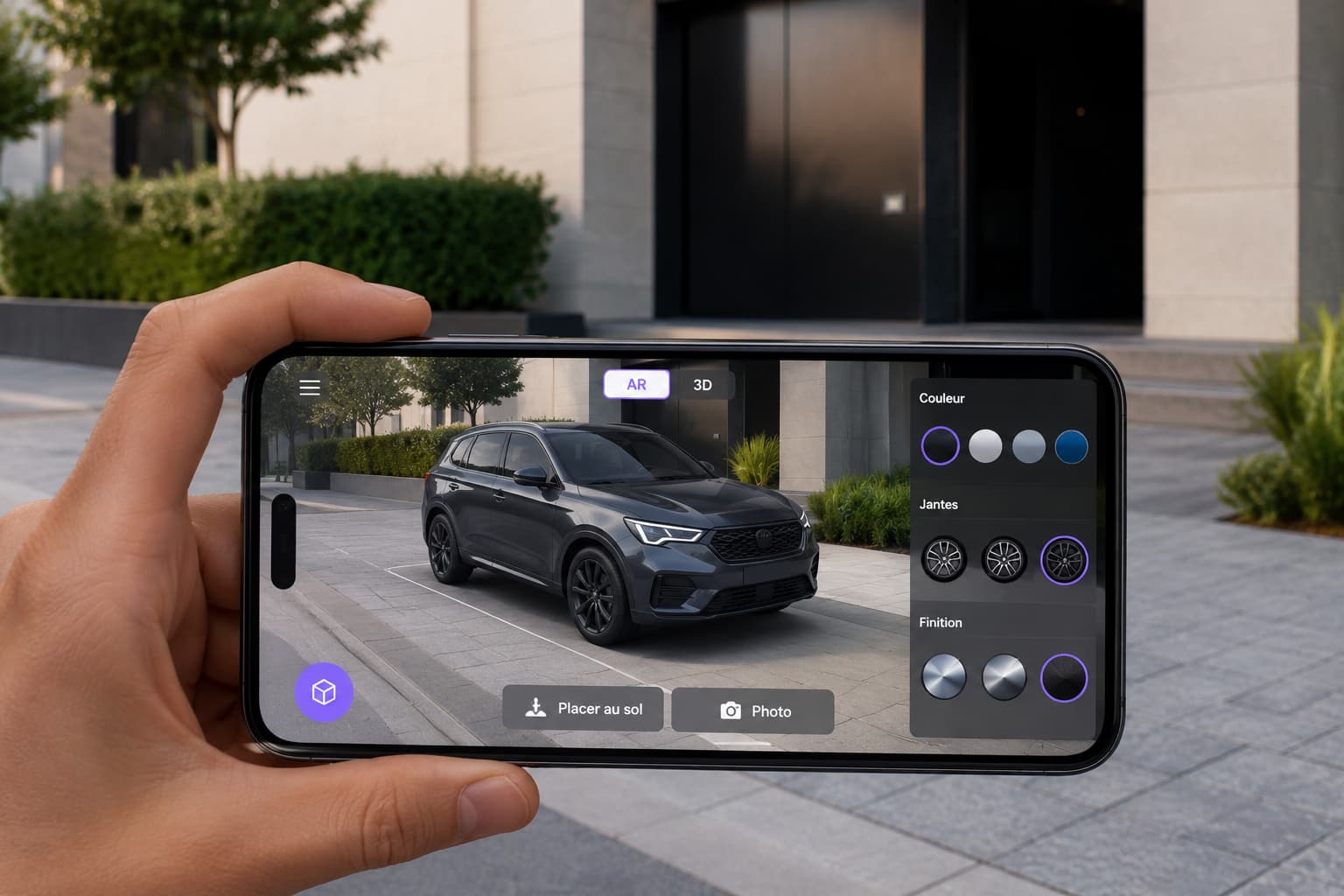
In practice, the visitor rotates the product through 360°, zooms in, changes the finish of a sofa, the wheels of a car or the engraving on a piece of jewellery, and watches the render update in real time. Many configurators add a layer of augmented reality (Web AR): viewing the product at full scale in the living room or garage, straight from the phone browser.
Two neighbouring things to keep separate:
- The 3D viewer: you rotate the product but cannot change it. That is consultation, not configuration.
- CPQ (Configure-Price-Quote): a B2B tool that configures and prices a complex offer (industry, equipment). A 3D configurator can sit alongside it, but its core remains product visualisation.
Does a 3D configurator really raise conversion?
Yes, on the right products — and the data converges. Shopify reports that product pages carrying 3D/AR content show a conversion rate up to 94% higher than pages without (a Shopify self-reported average, with no published methodology and now fairly old: read it as an order of magnitude, not a promise). Specialist vendors publish figures in the range of +30 to +40% conversion and up to -40 to -50% returns.
Three mechanisms explain the effect:
- Doubt removed. The buyer sees exactly what they are ordering — right colour, right material, right volume. Less uncertainty means more purchases and fewer "it wasn't like the photo" returns.
- Engagement. Handling a product increases time spent and attachment. A real-time configurator pilot at Audi lifted user engagement by 66% and paid-option selection by 9% per vehicle — so average basket value with it.
- The IKEA effect. When buyers take part in creating their product, they are more attached to it and more likely to close.
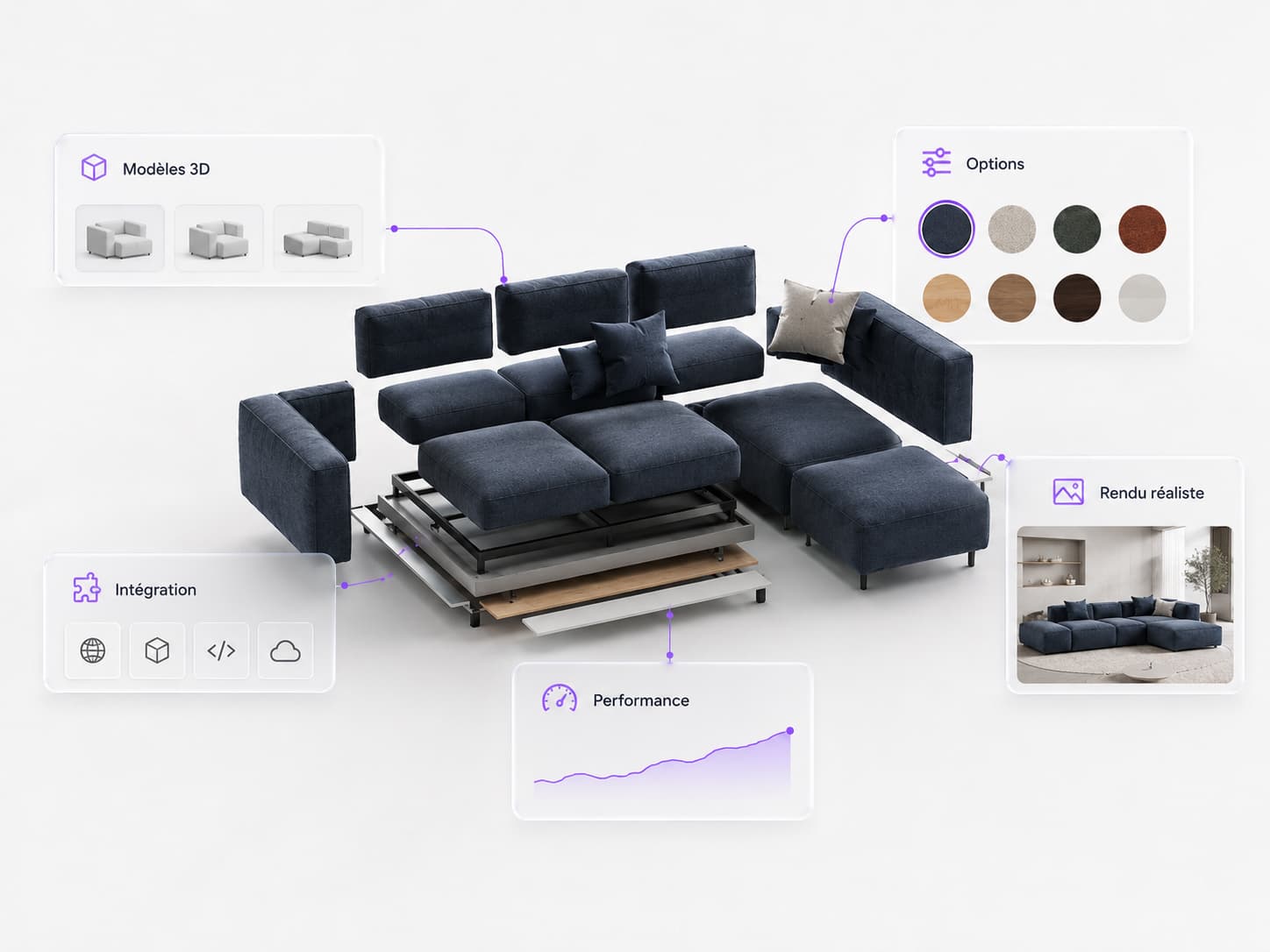
An honest caveat. These numbers are averages published by platforms that sell 3D: read them as orders of magnitude, not guarantees. The real gain depends on your catalogue, your traffic and the quality of execution. Our job, upstream, is precisely to say whether the game is worth the candle for your products.
Which products suit a 3D configurator best?
A 3D configurator pays for itself when the product is customisable, carries many variants and has a high unit value. On a simple, cheap product with no options, a good photograph does the job — and costs twenty times less.
| A 3D configurator is worth it | A 3D configurator is redundant |
|---|---|
| Customisable product (colour, material, engraving, modules) | Standard product with no options |
| Many variants, too many to photograph | 2-3 variants, easy to shoot |
| High unit value (doubt is expensive) | Low price, impulse purchase |
| Bulky or spatial product (AR reassures on size) | Product whose size is obvious |
| High return rate linked to appearance | Few returns, or logistics-driven |
The categories that gain the most:
- Furniture & interiors: sofas, kitchens, fitted wardrobes — material and dimension in space.
- Automotive & vehicles: colours, wheels, trims, full-scale AR.
- Equipment & industry: machines, modules, technical options.
- Packaging & point-of-sale displays: previewing custom packaging before production.
- Jewellery, sport, technical fashion: heavily personalised products where appearance decides the sale.
The point. The question is not "is the 3D beautiful" (it always is), but "is the doubt that 3D removes expensive enough to justify the investment". On a bespoke sofa or a car, yes. On a plain mug, no.
3D configurator or product photography: what is the difference?
A photograph shows one fixed state of the product; a 3D configurator shows every possible state, handled and to scale. Where a classic product page lines up 5 to 8 photographs of a single version, the configurator covers every combination without a new photo shoot.
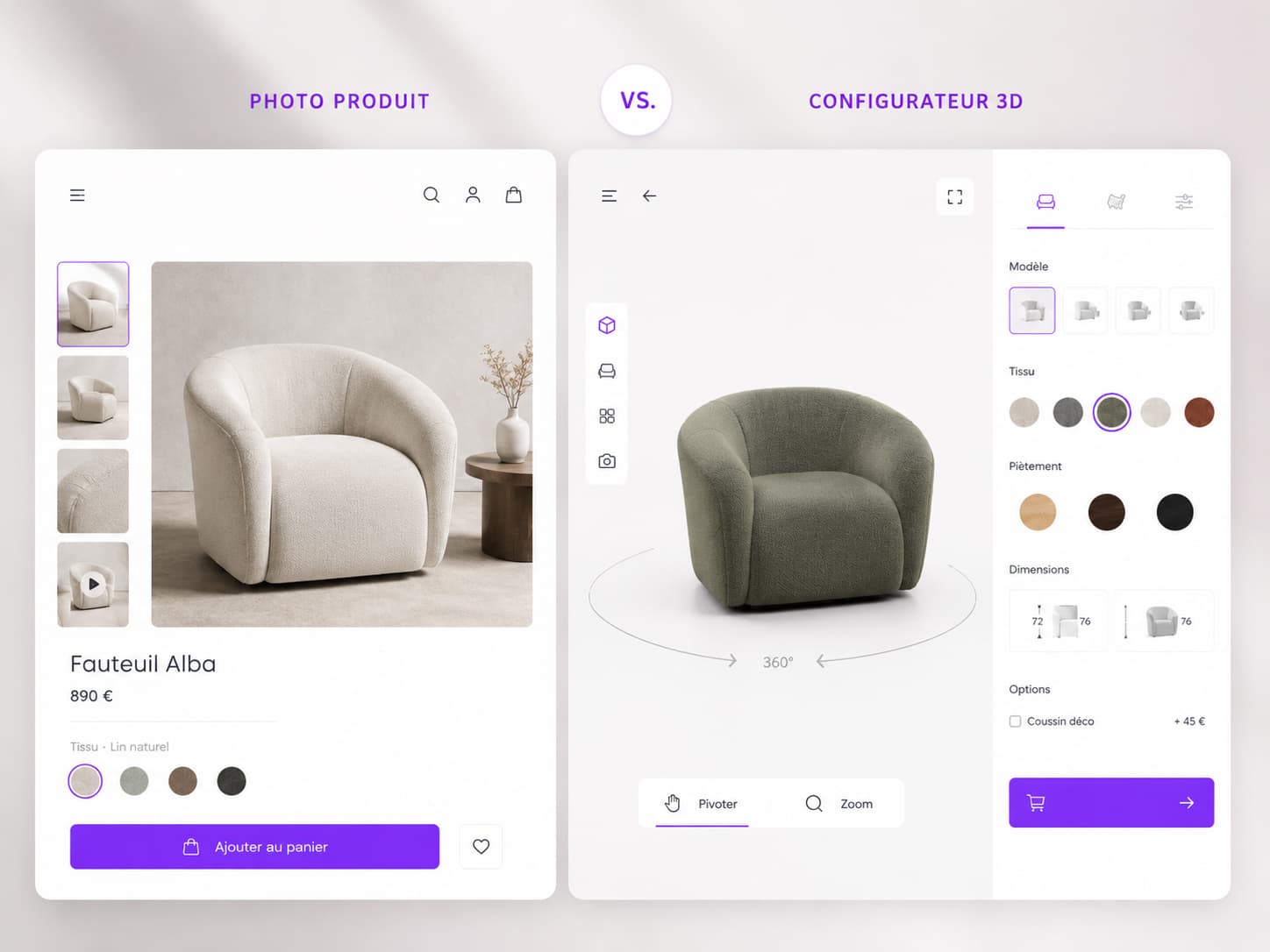
| Criterion | Product photography | 3D configurator |
|---|---|---|
| Variants covered | Those photographed | Every combination |
| Interaction | Static (zoom at best) | 360°, zoom, real-time personalisation |
| Scale (AR) | No | Yes, full scale in the real environment |
| Cost of a new variant | New photo shoot | A few parameters |
| Upfront cost | Low | Higher (modelling + development) |
| Performance / page weight | Light | To be controlled (WebGL) |
3D does not always replace photography: on many product pages the right setup is hybrid — lifestyle photography for emotion, a 3D configurator for personalisation and decision. Custom work is exactly what lets you tune that balance product by product.
Does a site with 3D stay fast and SEO-friendly?
Yes, provided the 3D is integrated HTML-first and loaded lazily. This is the real technical issue, and the main reason a badly placed configurator can do more harm than good. 47% of users abandon a page that takes more than 3 seconds to load, and Google indexes HTML, not what lives inside a WebGL canvas.
The principles we apply so a configurator breaks neither speed nor rankings:
- HTML-first. Title, price, description, CTA and variants exist as crawlable HTML text from the first load — before the 3D even starts. Google indexes the content; LCP settles on the title, not on the canvas.
- Deferred 3D (lazy load). The 3D engine loads only after the page renders (or on interaction), never on the critical path. Never lazy-load the LCP image (a mistake still found on 16% of pages according to the Web Almanac 2025).
- Optimised 3D assets. Compressed formats (glTF/GLB, Draco/KTX2), lightweight geometry, textures sized for the web.
- Mobile strategy. 68% of e-commerce traffic is mobile, where GPUs compile shaders more slowly: a fallback (high-quality WebP image, 3D on tap) keeps the page usable everywhere.
- Accessibility. Text alternatives, keyboard controls, contrast — good for the user and good for SEO.
This is precisely the engineering philosophy we have proven on public-facing 3D web experiences: on Nîmes-la-Romaine (with Aura, formerly EDEIS), we delivered a multilingual WebGL 3D web app, reachable from a simple QR code, that absorbed thousands of simultaneous connections with nothing to install. The same performance standard applies to an e-commerce configurator.
Off-the-shelf SaaS or a custom configurator: how to choose?
Off-the-shelf SaaS is the right call to start quickly on a small budget; custom becomes necessary once performance, brand consistency and integration with your ecosystem turn strategic. The market is crowded with vendors (Threekit, Emersya, Sloyd and others) who do standardised work very well — and sometimes that is the right answer.
| Off-the-shelf SaaS | Custom-built (agency) | |
|---|---|---|
| Time to launch | Fast | Longer |
| Cost | Monthly subscription | Project investment |
| UX and brand personalisation | Limited to the template | Complete |
| Performance & SEO | Inherited (third party) | Controlled and optimised |
| Stack integration | Ready-made connectors | Custom-built (CMS, PIM, ERP) |
| Dependency | On the platform | On your own code |
METASENSE's position is clear: we do not resell SaaS. We are a development and design agency that builds the configurator as a component of your site — integrated with Shopify, WooCommerce or Webflow, faithful to your identity, optimised for performance, and designed for conversion. It is the same combination of advisory and engineering that let us deliver 3D/AR configurators and experiences for the automotive sector, such as the WebGL 3D configurator and Web AR built for dealer group Edenauto on the Kia Picanto launch (vehicle viewable at full scale, a drive-to-store logic).
How do you integrate a 3D configurator on Shopify, WooCommerce or Webflow?
You integrate a 3D configurator either through a platform app or connector, or through a custom module embedded in the product page; in both cases the real work is wiring it to the catalogue (variants, price, stock) and optimising performance. Here is the logic platform by platform.
- Shopify. Native support for 3D media (glTF/GLB) and AR through the Shop channel. For genuine configuration, we develop a WebGL module wired to Shopify variants (price and stock synchronised), rather than stopping at the native viewer.
- WooCommerce. More open: the configurator is grafted into the WordPress product page and connected to WooCommerce variations through the API. Ideal when personalisation drives the price.
- Webflow. No native configurator: we embed a WebGL module (usually as a custom component or embed) and wire the options to the CMS or to e-commerce logic. This is the approach we know best, Webflow being one of our core platforms.
Whatever the platform, the project sequence is the same: scoping (which products, which options) → 3D modelling → configurator development → catalogue wiring → performance and SEO optimisation → mobile and accessibility testing.
How much does a 3D product configurator cost?
There is no single price: a 3D configurator ranges from a few hundred euros for a simple SaaS module to several tens of thousands of euros for a fast, fully integrated custom build. The cost splits into two distinct items: 3D modelling (one model per product) and development of the configurator itself.
What moves the budget:
- The number and complexity of the 3D models to produce (one product is not a whole range).
- The depth of the options (3 colours versus hundreds of combinations and constraints).
- The level of realism (PBR rendering, AR, animation).
- Integration with your stack (variants, dynamic pricing, PIM/ERP).
- The performance and accessibility targets.
On pricing. The ranges above are market benchmarks meant to orient the reader, not our rates. We price each engagement individually, after scoping, because the cost depends entirely on your catalogue and your conversion targets. The right question is not "what does it cost" but "how much margin is one extra conversion point and 20% fewer returns worth on this product".
Let's talk about your 3D configurator project
You sell a customisable, high-variant or high-value product, and you are wondering whether a 3D configurator would lift your conversion? The real answer starts with honest scoping: which products justify it, and how to integrate it without breaking your performance. That is exactly our work — designing, developing and deploying 3D web experiences that serve the business, not the demo. And when the product also has to be shown at a trade show, in a sales meeting or in training, we turn it into an interactive 3D demonstrator.
Let's talk about your project →
FAQ — 3D product configurator
What is a 3D product configurator?
It is an interactive web module that displays a product in real-time 3D (WebGL) and lets the visitor personalise it — colour, material, dimensions, options — while seeing the result immediately, from every angle, often with a full-scale augmented reality option.
How much does a 3D product configurator cost?
There is no single price. A simple SaaS solution starts at a few hundred euros; a fast, fully integrated custom module reaches several tens of thousands of euros. The budget depends on the number of 3D models, the depth of the options and the integration with your stack. We price each engagement individually, after scoping.
Does a 3D configurator really raise conversion?
Yes, on the right products. Shopify has reported a conversion rate up to 94% higher on product pages with 3D/AR content, and vendors publish +30 to +40% conversion with -40 to -50% returns. A caveat: these are self-reported averages, not guarantees — the real gain depends on your catalogue and the quality of execution.
What is the difference between a 3D configurator and product photography?
A photograph shows one fixed state of one version; a 3D configurator shows every combination, handled through 360° and to scale. Photography is cheaper but does not cover the variants; 3D covers the whole catalogue without a new shoot. The right setup is often hybrid: lifestyle photography plus a 3D configurator.
Which products suit a 3D configurator best?
Customisable products with many variants and high unit value: furniture, kitchens, automotive and vehicles, industrial equipment, packaging and point-of-sale displays, jewellery, sport. On a simple, cheap product with no options, a good photograph does the job for far less.
How do you integrate a 3D configurator on Shopify, WooCommerce or Webflow?
Shopify handles 3D/AR media natively; for genuine configuration we develop a WebGL module wired to the variants. WooCommerce integrates through the WordPress variations API. Webflow has no native configurator: we embed a WebGL module wired to the CMS. The common challenge remains catalogue wiring and performance.
Does a site with 3D stay fast and SEO-friendly?
Yes, if the 3D is integrated HTML-first and loaded lazily. The content (title, price, description) must exist as crawlable HTML before the 3D starts, and the 3D engine must load off the critical path. With optimised assets (glTF/GLB) and a mobile fallback, 3D degrades neither speed nor rankings.
Do you have to add augmented reality (AR)?
No, but it is a strong lever for products where size matters (furniture, vehicles). Web AR lets the buyer view the product at full scale in their real environment from the browser, with no app. It plugs naturally into an existing 3D configurator.
Should you choose off-the-shelf SaaS or custom development?
Off-the-shelf SaaS is ideal to start quickly on a small budget, but you inherit the platform's performance and branding. Custom becomes necessary once speed, visual identity and integration with your ecosystem (CMS, PIM, ERP) turn strategic for conversion.